Product strategy, AI UX, Design Systems & Delivery
Saas AI
Eye10.io — redesigning an AI-powered SEO SaaS platform
Responsibilities
Product Design, Strategy, Branding, No-Code Development
Stack
Framer, Figma, Adobe CC
Timeline
1 year
Overview
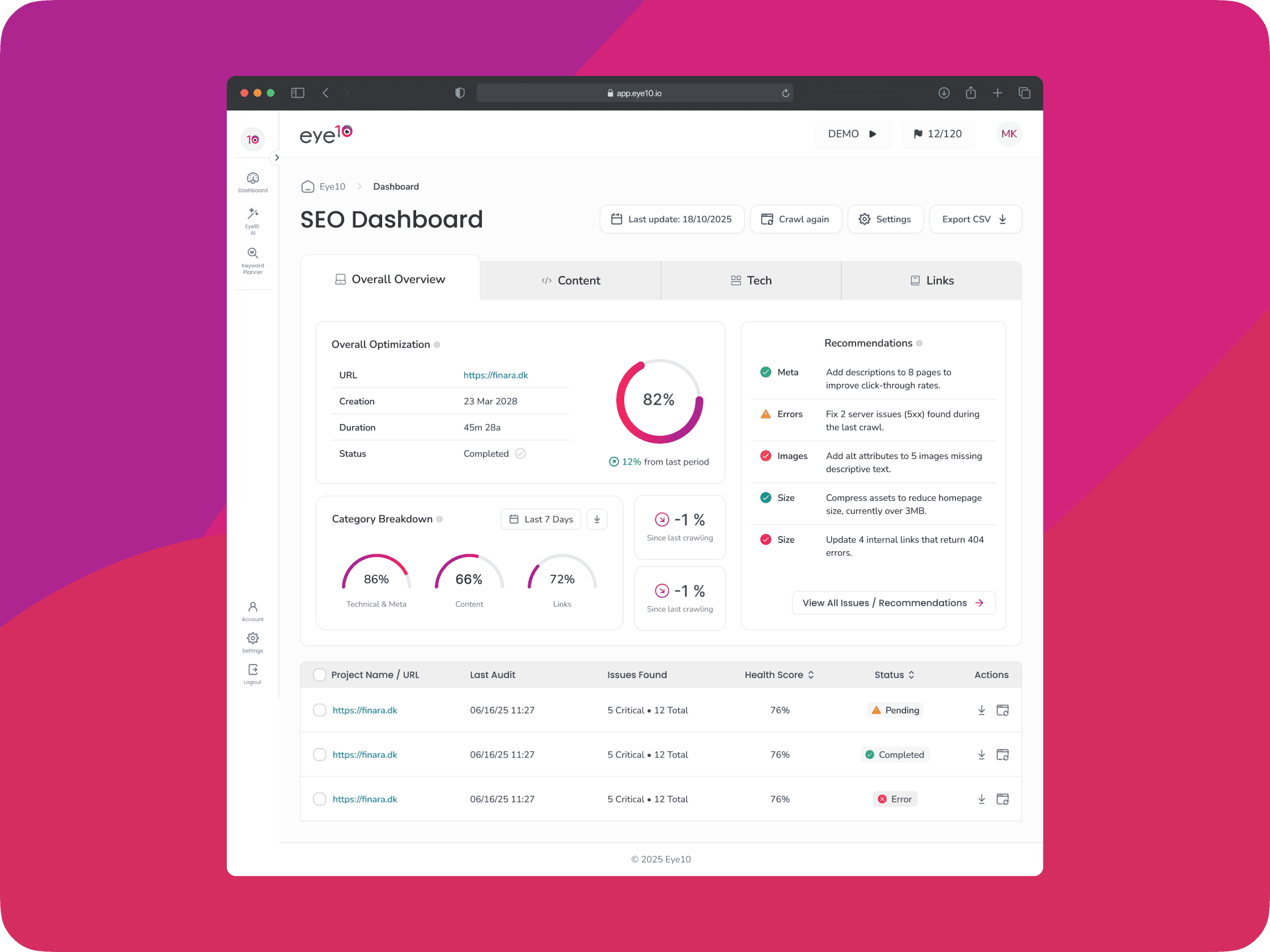
This project encompasses a complete product transformation of Eye10.io, moving beyond surface-level UI improvements to fundamentally restructure how users interact with SEO intelligence through AI-powered workflows. The redesign addresses critical business objectives: increasing user retention, expanding into enterprise markets, and establishing a scalable product foundation that leverages machine learning for automated SEO insights.
Working closely with CEO leadership and product strategist Mads—a seasoned SEO expert—I’ve led the product design strategy that transforms fragmented SEO reporting into an integrated AI-driven analytics ecosystem. This involved designing intelligent recommendation engines, automated reporting workflows, and predictive analytics interfaces that adapt to user behavior and industry trends. The project is currently in development phase, with launch planned for Q3 2026.
Project highlights
AI-assisted SEO workflows: Translated complex SEO analysis into prioritised recommendations and actionable product journeys.
70% faster prototype tasks: Early test participants completed competitive-research tasks
70% faster using the automated workflow. Add participant numbers and methodology.
Product operating model: Introduced structured sprint planning, design reviews and clearer collaboration between leadership, design and engineering.
Scalable design foundation: Created reusable components and interaction patterns for the new platform.
The challenge
Eye10.io faced significant product-market challenges in an AI-first competitive landscape. User churn remained high due to manual reporting processes and lack of actionable insights. The current platform required users to manually interpret data without intelligent recommendations, creating friction for time-constrained marketing teams. The existing architecture couldn’t support the complex AI workflows required for automated competitive analysis, predictive keyword opportunities, and intelligent content optimization suggestions.
Beyond the product issues, I walked into a company with no design culture and chaotic development processes. The development team was working without structure—no sprints, no planning, just random feature requests getting built whenever someone felt like it. There were no design tools, no user testing budget, and features took months to ship because nobody knew what they were supposed to build. The talented development team was frustrated by vague requirements and constant direction changes, while the CEO wondered why simple features took forever to deliver.
My role
As Lead Product Designer, I owned the complete product design strategy and execution, with special focus on designing AI-powered user experiences. This included defining how machine learning outputs would be presented to users, creating interfaces for AI-generated recommendations, and establishing design patterns for algorithmic transparency. I collaborated directly with the CEO on product vision and business objectives, worked extensively with Mads to understand deep SEO workflows and validation requirements, and partnered closely with the engineering team to ensure AI model outputs could be effectively translated into user-friendly interfaces.
Equally important, I had to completely restructure how the team worked. Half my role became organizational therapy—implementing proper Agile methodology with two-week sprints, training developers to work with design specifications, and establishing cross-functional collaboration processes. I facilitated sprint planning sessions, created design-to-development handoff workflows, and embedded myself with developers during AI feature implementation to ensure seamless execution.
Process
I started by building design infrastructure and development processes simultaneously. Before touching any interfaces, I spent three weeks setting up proper design operations—getting the team on Figma, establishing design review processes, and creating our first user research plan. More critically, I implemented proper Agile methodology with structured two-week sprints, daily standups, and cross-functional planning sessions that included the CEO, Mads, and the entire development team.
I embedded myself with Mads for weeks, learning everything about keyword research, competitive analysis, and content optimization workflows. This deep SEO expertise allowed me to design intelligent workflows around AI-powered opportunity discovery, automated competitive intelligence, and predictive performance modeling. I created adaptive onboarding flows that use AI to customize dashboards based on user industry and company size, while designing algorithm transparency patterns that explain how recommendations are generated. Working closely with developers, I established component libraries that leveraged existing code patterns while ensuring visual consistency and created detailed specifications that eliminated back-and-forth confusion during implementation.
Outcome
The platform is currently in development and scheduled for launch in Q3 2026, with all design work completed and development progressing through our structured sprint process. Early prototyping and user testing sessions indicate the new AI-driven approach will significantly reduce the manual effort required for SEO analysis, with test users completing competitive research tasks 70% faster using the automated recommendation engine. The comprehensive design system and component library we’ve established has already accelerated development velocity, with the team now shipping features in weeks rather than months.
The organizational transformation has been equally impactful. Our structured two-week sprint methodology has eliminated the chaos that previously plagued development cycles, and the cross-functional planning process ensures alignment between design, development, and business objectives. The CEO has noted dramatic improvements in team coordination and feature quality, while developers report higher job satisfaction working with clear specifications and structured processes. Post-launch, we expect these improvements in team efficiency and product quality to translate into measurable business outcomes including increased user retention and successful expansion into enterprise markets.
Key design decisions
Reflection